The free image capture software for Nikon DSLRs that I presented few days ago was only for a Mac. Now PC users will have also something to play with - DCamCapture (thanks Fabian):
Functions:
- Copies images during shooting
- Start Image capture
- Timer to capture image sequences
- LiveView with image capture and video recording (MJPEG in AVI file) function
- Writing IPTC data in Bibble 4 files (*.bib)
- Battery charge state
- Application window always on top option
Supported Cameras:
- D40, D40x, D60, D80, D90
- D200, D300, D700
- D3, D3x
I haven't tried it yet, but here are some screenshots:
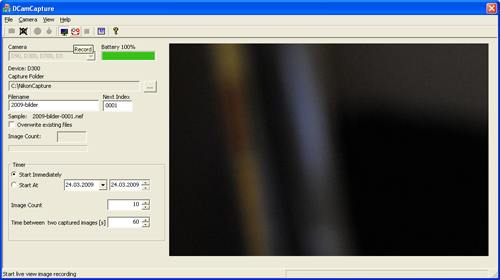
Live view
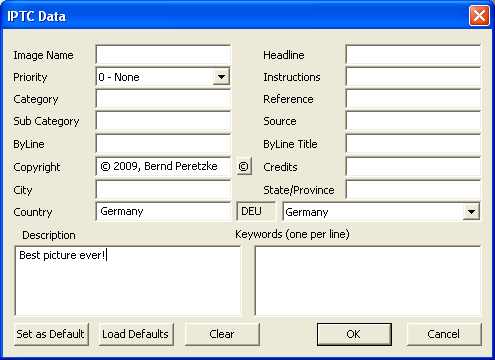
IPTC data
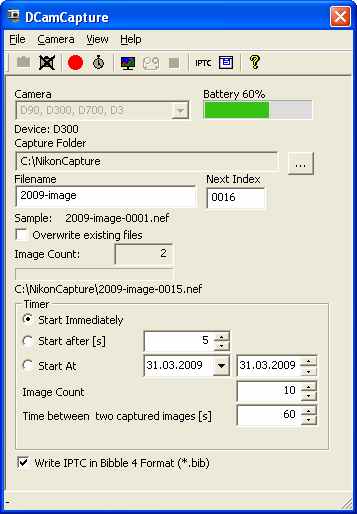
App window

I will continue to support and promote free software for Nikon equipment. If you have one, send it over.
Nikon's free SDK can be downloaded here.
Related posts:
36 Comments
Thanks! Works great!
It sucks with my D200. Defective conectivity.
LiveView doesn’t work with my D90
I don’t think that you’d use this on a D90 because it can already do 720 video….
This software allows pre D90 cameras to do video at a low resolution.
Resolution is 640 x 426 with 15 fps.
can somebody explain why we have such thing like this?
is it making us, the photographers, lazier – especially americans?
That doesn’t make it really easier or you lazier … firstly you have to carry around your laptop in addition to the camera equipment.
ummm did you have to use the A word
its the same thing as buying a timed wired remote!!!! but cheaper
Here’s why we have “such a thing like this.” http://counter.imagemechanics.com/capture/56-five-reasons-to-shoot-tethered Tethered shooting is what separates the men from the boys. Although it’s not an option for some industries, like weddings for example.
Why would this software make american photographers lazier? If indeed the purpose of this software is to make us lazier, wouldn’t the added laziness-factor be the same for european, asian and other photographers? Just wondering…
In addition to that, just looking at the screen captures, this can be used e.g for time lapse photography. Nothing lazy about that – at least I don’t think so…
I just might have to try this one out. I have been too “lazy” to try out the other ones that have been mentioned on NR.
I cant get the video to work with the D40 (yet) but it does work perfectly for what I need it to do.
Thanks for the heads up on the software.
Good timing NR. I’m shooting for the US Forest Service tomorrow covering a large swath of territory via fixed wing. The object is to capture high-res photos of shorebirds, and because of the ridiculously large number of photographs required to cover that area, shooting with just CF cards would have been a hassle, not to mention the time wasted switching them out when full.
im getting “cant select source” with my d40
its in mtp/ptp mode already
any suggestions?
Have you upgraded your firmware to 1.12?
I just upgraded my D40 and it worked perfectly
you dont need the up date. my d40 is running on 1.0 and it worked just fine. make sure to turn ptp on and the software on b4 plugging in. Take out the sd card, set the folder and just try to take a pic with the camera shutter. check to make sure the pic save to the location. I have yet to use any of the other features so cant help there.
I have the firmware update too and it’s works just fine with my D40X.
Nice work! Not all features working with D200 and crashes occasionally with my Vista 64bit machine, but it is great to see such tool is available to playwith.
I need o use camera’s shutter to actually capture the image and the image is certainly transferred to PC directly.
Thanks for the recommendation, I’ve been waiting for a PC software ever since you mentioned the Mac program.
I’ve never thought much about tethered shooting before, so forgive my ignorance: What kind of cable do I need for this? One of the ones in my D300 box or do I need to buy something special?
– snorri
the USB cable that came with your camera is fine
Cool, thanks. I’m going to try that first thing when I get home!
– snorri
How can it do live-view on a camera that doesn’t have live-view in the first place?
nice piece of software, but almost nothing works on my D200 : The only thing that works is when i press the shutter manually then the photo is transfered to my folder.
liveview , timer , and remote shutter does not work , timer crahses actually.
I wonder if the liveview is only for recording video on D300 & D3 , useless on D90…
Anyone got videos on D40/X and D200?
Logically live view doesn’t work with cams without live view. Currently the app didn’t handle these differences very well (Version 0.5!). It is tested with a D300 so I can’t ensure that it works with other cams out of the box. Be patient…
Bernd
If live view works on with cameras that have live view, will the timer work only with cameras that have a built in timer?
Works fine with my D300. Even making movie with Live View works fine. With Live View its also possible to take pictures. Great for composing with the bigger view on pc monitor. Thx
Hehe, glad to see my hint posted here. Have fun with it
Three cheers for German SDK developers
Regards, Fabian
By the way: thanks and greets to the developer (not me) can be sent here:
E-mail: dcamcapture@bernd-peretzke.de
Always a good thing for a developer to get a positive feedback on his work.
I am not sure if it is a good idea to post his email address here – the spammers are everywhere…
Hm, bad idea, indeed. If you are still able to delete the adress, do it.
*headbang*
hmm…. there isn’t a “PC Version”. It’s just Windows. or for mac.
but no linux or s.th like this. pc-version is wrong…
Hmm is there similiar for D70(s)???
Is there any risk in using this software? What is PTP mode?
What program do I run this on?
This is a stand alone program – just try to run it alone.
Hmmm… thank you, but seems like my computer wouldn’t recognize the program, keeps on asking me to select the program to run it. =P dumb PC.
Thank you though~
Used this last night on a D300.
Works really well.
Very impressive, and very easy to use.
simon