• The new Nikon 300 f/2.8 VRII and the TC-20E teleconverter now available for pre-order

Nikon Control Beta 3 released

Update: the software has a new name and a new website: http://www.sofortbildapp.com/

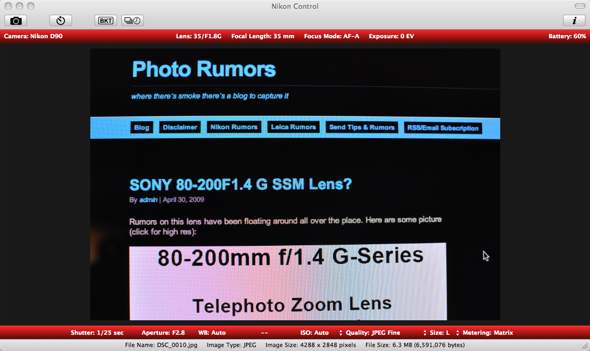
nikon control beta 3 Nikon Control Beta 3 released

I guess Stefan works on the same schedule as Nikon – he just released his Nikon Control Beta 3 :-)

New Features:

  • Automatic HDRI Creation 
  • Editable Settings 
  • Aperture and iPhoto Auto Import
  • GPS Map
  • Self Timer 
  • Focus Mode Status 
  • Enhanced Viewer
  • Configurable Background Color 

Improvements:

  • Much Nicer Design
  • Histogram View in Inspector
  • Faster Histogram Calculation
  • Same Index for Bracketing
  • General Image Details
  • Smaller Main Window

Please note that this is not a Nikon product, however it is based on the Nikon SDK and I can say that it is almost equally good and useful… and free.

Thanks Stefan and keep up the good work!

Download Nikon Control Beta 3 here (Mac only).

See other free Nikon-related software here.

Related posts:

  1. Nikon Control Beta 2
  2. Nikon Control Beta 1
  3. Free PC capture software for Nikon DSLR
  4. Camera Control Pro v.2.7.1 released
  5. Nikon RAW Codec v1.7.0 & Camera Control Pro 2 v2.5.0 released

This entry was posted in Free software. Bookmark the permalink. Both comments and trackbacks are currently closed.

15 Comments

  1. Anonymous
    Posted April 30, 2009 at 9:29 pm | Permalink

    automatic HDR?

    oh great, softwares are starting to make photographers even lazier…

    • Posted May 1, 2009 at 1:33 am | Permalink

      Oh, but this one is for tethering. Few months ago some camera manufacturer released that camera that had HDR-built in. It also took panoramas just by swiping the scene. I don’t remember the model or the maker, but it was one of the big ones.

      • Phil
        Posted May 1, 2009 at 2:00 am | Permalink

        The Sony DSC-HX1 does the sweeping panorama.

        The Fujifilm Finepix F200 EXR and Ricoh CX1 do something sorta like HDR.

        And I’m sure there are other makers with similar features.

  2. Willlis
    Posted May 1, 2009 at 12:04 am | Permalink

    Photo Rumors? Ha… when did you start that?

    • Posted May 3, 2009 at 2:38 pm | Permalink

      just recently – to cover the remaining brands :)

  3. Fenst
    Posted May 1, 2009 at 3:31 am | Permalink

    will wait for windows one

  4. Mac only?
    Posted May 1, 2009 at 4:24 am | Permalink

    Mac only? When most users have Windows PC! Could the developer plans a Windows version?

    • funny
      Posted May 1, 2009 at 8:03 am | Permalink

      It must be like the 5th mac app ever.

  5. Willis
    Posted May 1, 2009 at 9:36 am | Permalink

    This guy just writes the program… Its his so he can write it for whatever OS he pleases. I believe Nikon has a PC based SDK as well, so have at it if you like.

    Seriously though, as photography goes, the only PC program that i wish were available on Mac is Corel Paint Shop Pro… I’d say there is more selection available for Mac than PC if your a photographer.

  6. Daniel
    Posted May 1, 2009 at 9:53 am | Permalink

    Oh please, please, please port it to Windows….

  7. Posted May 5, 2009 at 6:23 am | Permalink

    Hi everybody,

    “Nikon Control” is now called “Sofortbild” (german for “instant image”): http://www.sofortbildapp.com

    The new version is almost identically to Beta 3 with some small bugfixes and improvements.

    - Stefan

  8. NubNikonist
    Posted May 9, 2009 at 5:14 am | Permalink

    Hey, so kind of dumb question, because I don’t know any better.
    Do I run this program on SDK to make it run on windows?
    And can I use my USB cable to connect the camera to the PC?

    Don’t flame me I’ma NU~B =)

  9. Posted May 19, 2009 at 10:43 am | Permalink

    Am I the only one that is a bit curious about the 1.4 85-200 text on the screen?