Nikon Control Beta 1

Please note that this post is not about Nikon's Camera Control Pro software, but rather for an app developed by a reader (to prevent confussions the name of the app will be changed soon).
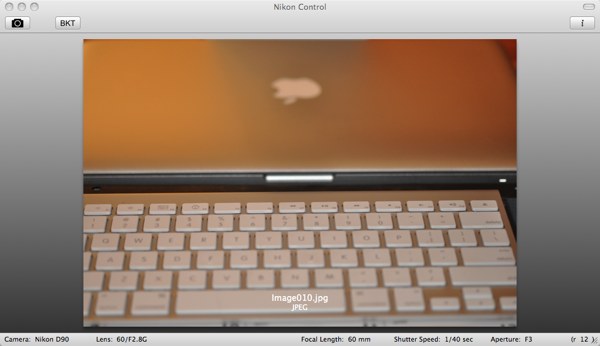
nikon control Nikon Control Beta 1

First was the D700 video capture software, which revealed the existence of the Nikon SDK package, then was my "quest" for other interesting implementations and now I have something to show you:

"The result is an early version of Nikon Control. The application should work with any Nikon D3, D2, D700, D300 and D90 (I’ve tested it with my D90 and a friend did the same with his D300). When you connect your camera to your Mac the application will automatically detect the camera (if the model is supported) and display the most important settings in the bottom bar. In this version you can either capture a single picture by clicking the toolbar item or pressing the trigger on your camera. When you are using autofocus the camera might not be able to focus thus don’t take a picture. In addition you can do bracketing by selecting minimum and maximum shutter speeds. The application then will take a picture for all shutter speeds in the range."

The main benefit? You can take more than 3 pictures in bracketing mode.

If you try out this software, please give you feedback to the author on the above link and remember that this is a beta version. Read the readme file on how to install. For Mac only. The app has also a built-in EXIF viewer.

Thanks Stefan!

Disclaimer: Please note that this software is not created by Nikon and it is probably a good idea for Stefan to change the name.

Related posts:

  1. Nikon Camera Control Pro 2.4.0, Capture NX 2.1.1 released
This entry was posted in Nikon Software and tagged . Bookmark the permalink. Both comments and trackbacks are currently closed.

34 Comments

  1. Alex
    Posted February 19, 2009 at 12:02 am | Permalink

    it would be great benefits for DSLR D90 filmmakers to be able to at least:
    - initiate video recording from the application (as there’s currently no remote to launch video recording on d90, very inconvenient to use on a crane)
    - being able to at least see the Shutter speed and iso would be nice that d90 chooses for video recording
    - of course control over shutter, iso, frame rate in D90 video mode would be huge
    - if one can make any nikon FX camera record HD video like D90, this would be big too.

  2. Peter
    Posted February 19, 2009 at 1:25 am | Permalink

    It just crashed when I tried to run it. Think it needs a little more work before it’s ready for primetime.

    • Posted February 19, 2009 at 8:46 am | Permalink

      You have to copy the library folder manually.
      See the readme file.

  3. Evan
    Posted February 19, 2009 at 2:27 am | Permalink

    Just tried to load it on my new macbook and Just like Peter it just crashed too. Would be awesome if it worked as i’ve got a D90.

    • JasonH
      Posted February 19, 2009 at 2:42 am | Permalink

      Have to third that, crashes every time I launch it within 5 secs. MPB 2.4GHz 4Gb RAM on 10.5.6. Keep trying as this would be a really cool solution.

  4. David
    Posted February 19, 2009 at 2:43 am | Permalink

    I loaded it on to macbookpro and it worked no problem …Can´t see the point though as nikon´s camera control pro 2 is a much better program.
    I took one picture but the photo was not transfered or recorded to camera…
    It supports D3X.

    • SmokeJaguar
      Posted February 19, 2009 at 2:47 am | Permalink

      Can´t see the point though ?
      Nikon´s camera control pro 2 = £137.18 in UK

      • Posted February 19, 2009 at 8:47 am | Permalink

        This one is free?

        • David
          Posted February 19, 2009 at 11:43 am | Permalink

          Camera control pro 2 works..it is a full studio suite ..the program here is not in the same class — from my trial it is totally useless
          If you need control from the computer buy Camera control pro 2 , if you just want to play a little use this.
          How does it go – you get what you pay for :-)

  5. calvin
    Posted February 19, 2009 at 2:48 am | Permalink

    i hope that there’ll be a version for XP version

  6. Chris
    Posted February 19, 2009 at 3:27 am | Permalink

    Recently ther were some news (i think it was here on nikonrumors) about a similar application in beta state like Camera control pro . Can anyone remember the name or where to find it?

    • Chris
      Posted February 19, 2009 at 4:01 am | Permalink

      on http://www.d-software.co.za/ you can find similar for windows and d60. but there must be something else, i cant remember right now.

  7. Posted February 19, 2009 at 3:31 am | Permalink

    I don’t really see any difference between this and Camera Control Pro?

  8. anony
    Posted February 19, 2009 at 3:32 am | Permalink

    i am kind of confused here because i have been using Nikon’s Camera Control Pro2 on Windows. but this guy is saying this is only for mac?

  9. anony
    Posted February 19, 2009 at 3:36 am | Permalink
  10. Posted February 19, 2009 at 3:48 am | Permalink

    This is another software for D60, but theres still another one which I dont remind right now
    http://www.d-software.co.za/

  11. Posted February 19, 2009 at 3:56 am | Permalink

    another remote control software for d60
    http://www.d-software.co.za/

    • Craig
      Posted February 26, 2009 at 2:00 am | Permalink

      Thanks Chris

      I just downloaded this remote control and it is working for my D40.
      I thought I would give it a try all works ok but there is a time lapse bracketing section what is this used for?

  12. SmokeJaguar
    Posted February 19, 2009 at 4:10 am | Permalink

    Works fine and no crashes on my MacBook Pro, did you ppl read the “readme”?
    Pictures are saved to your “Pictures” folder on yer Mac.

  13. Posted February 19, 2009 at 4:31 am | Permalink

    Nikon SDK has always been available – just a matter of asking/looking for it.
    Existed way before the D700 came along.

  14. Posted February 19, 2009 at 7:30 am | Permalink

    Hi,

    For those of you who you say the app crashes on launch:

    Did you copy the files from the Nikon folder (it contains the camera driver)? If you don’t copy the files to the right directory the application will crash on launch. Unfortunately Nikon wrote the SDK in a way that the files have to be in this directory, so I can’t put them into the application bundle.

    - Stefan

    • JasonH
      Posted February 19, 2009 at 11:08 am | Permalink

      I thought I had manually dragged the files to the right folder (I already had a nikon folder in app support) but this morning I discovered that I must have seen “control” in the Picture Control Utility folder and mistook that for the right one. Once I created the Camera Control folder and moved the files it works fine. Great effort!

      The only other thing you might want to put in the readme is that for users like me who have USB set to Mass Storage, you have to switch it to MTP/PTP for it to work (at least on my D300).

      • Posted February 19, 2009 at 11:12 am | Permalink

        Yes thanks for the hint. The D90 does not have a switch for that.

      • Pablov
        Posted February 19, 2009 at 12:08 pm | Permalink

        Very Good information.
        Thanks!

  15. Posted February 19, 2009 at 12:37 pm | Permalink

    I works on my D90,

  16. Posted February 19, 2009 at 2:32 pm | Permalink

    I think some of you are missing the point. Yes, the SDK has been out for awhile, but it really hasn’t been exploited. This application does offer some functionality that may be useful to some, but more importantly, it demonstrates the possibilities for Nikon users that may have been previously only thought to be available via Canon’s SDK.

    Kudos for this. Independent developers working on Nikon apps is an exciting thing.

    • Posted February 19, 2009 at 3:08 pm | Permalink

      Yes, this was exactly the point I was trying to male with post.

  17. Will
    Posted February 19, 2009 at 5:34 pm | Permalink

    There’s also this one from DIYPhotoBits.com – http://www.diyphotobits.com/download-diyphotobitscom-camera-control/

    It’s designed to run on Windows only as it’s built on top of Windows WIA (Windows Image Acquisition), which comes with windows.

  18. robot
    Posted February 20, 2009 at 4:44 am | Permalink

    Works perfectly on a D300

  19. Kevin
    Posted February 25, 2009 at 9:34 pm | Permalink

    I love this. I’m looking forward to what will be coming in it.

    I hooked my D300 up to my MacBook and once I read the readme it was working instantly.

    This just eliminated one area of software I was looking into at least for the interim.

    My first feature request would be to be able to set a filename sequence and location.

  20. fLUO!
    Posted February 27, 2009 at 1:05 pm | Permalink

    That is very cool. Thanks to the creator of this app, you’re great!! Your work is appreciated, please keep improving it!

  21. Francisco
    Posted April 10, 2009 at 6:48 am | Permalink

    Great product – well done in taking the trouble to write it and then sharing it with your photo community. I have connected up my D700 and it worked fine in taking picture via the camera icon on screen and displaying settings as I changed them.

    Can you tell me Stefan whether you intend to implement Live View for the D700 as that would be the icing on the cake!

  22. Posted April 18, 2009 at 10:11 pm | Permalink

    Thank you SOOOOO much for this. I would love to pay you a small fee for this. It is wonderful. I have been looking for a way to tether and interval shoot without paying nikon 200 dollars. I will link to your project from my blog.